
PPC software for agencies breaks even when the value of verified time saved covers the software’s full operating cost. Divide that cost by the value of an hour you can actually redirect to client work, then compare the required hours with net time saved. Include setup, checking, maintenance, and exception handling—not just the campaign tasks the software removes.
- PPC software for agencies earns its place when verified time savings cover its full operating cost.
- Calculate net hours saved after setup, checking, maintenance, and exception handling.
- Saved campaign-management time becomes capacity only when you can use it for client work.
- AdCrew OS is positioned for one-person agencies evaluating autonomous ad campaign management.
AdCrew OS is a pre-launch software platform for autonomous ad campaign management, positioned around helping one person manage more client accounts. Treat that positioning as a buying category to evaluate, not evidence of hours saved in your agency.
How do you calculate break-even time savings for PPC software for agencies?
Use two calculations: one establishes the time savings you need; the other measures the time savings you get. Keep both on the same measurement period. Comparing a recurring expense with a one-time time saving produces a misleading result.
| Calculation | Formula | What it tells you |
|---|---|---|
| Required hours saved | Full operating cost ÷ usable hourly value | The time saving needed to break even |
| Net hours saved | Baseline task hours − remaining task hours − software overhead hours | The time genuinely returned to you |
| Break-even test | Net hours saved × usable hourly value ≥ full operating cost | Whether the measured saving covers the cost |
| Capacity test | Recoverable work blocks fit additional client responsibilities | Whether saved time supports more accounts |
The software clears the time-saving test only when net hours saved meet or exceed required hours saved. Clearing that test does not prove that you can accept another client. Account capacity also depends on communication, approvals, strategy, and other work outside campaign execution.
Full operating cost means the recurring software expense plus relevant supporting expenses. If you spread a one-time expense across several measurement periods, state that assumption separately. Keep your setup hours in the time calculation so you do not count the same burden twice.
Usable hourly value is the value of work you can realistically do with the recovered time. It is not automatically your advertised hourly rate. A free hour without a paid assignment, a necessary internal task, or a deliberate personal use has a different economic meaning from a booked hour of client delivery.
Why this matters for a one-person agency
Your limiting resource is not just campaign-management time. It is your attention across every client responsibility. Software that removes an execution task but creates a new checking routine can shift work without reducing it.
The useful buying question is therefore narrower than whether a platform automates PPC. Ask whether it removes a recurring bottleneck while leaving you with an acceptable review burden. That is the difference between buying another interface and creating usable capacity.
For your 2026 evaluation, separate three outcomes:
- Lower workload: You spend less time delivering the same service.
- More capacity: You can take on additional client responsibilities without extending your working schedule.
- Higher contribution: The recovered time supports work whose value exceeds the added operating burden.
These outcomes are related, but they are not interchangeable. You can achieve lower workload without adding revenue, and that can still be a deliberate business decision. Record the benefit you actually want before choosing the measurement method.
Establish your 2026 baseline before evaluating software
Measure the work the proposed software would replace. Do not use your entire working week as the baseline unless the proposed workflow actually covers every task in it.
Use a task log with the client account, task, elapsed working time, trigger, and outcome. Separate execution from judgment: changing a setting is different from deciding whether that change fits the client’s objective. That distinction keeps the evaluation focused on work the software can demonstrably handle.
Follow the work from trigger to completion
- Task scope: Name the recurring task and define what completion means.
- Baseline time: Record the current process, including preparation and follow-up.
- Software time: Measure the replacement process from the same trigger to the same outcome.
- Exception time: Include checking, corrections, escalations, and maintenance.
- Capacity check: Identify where the remaining time fits in your working schedule.
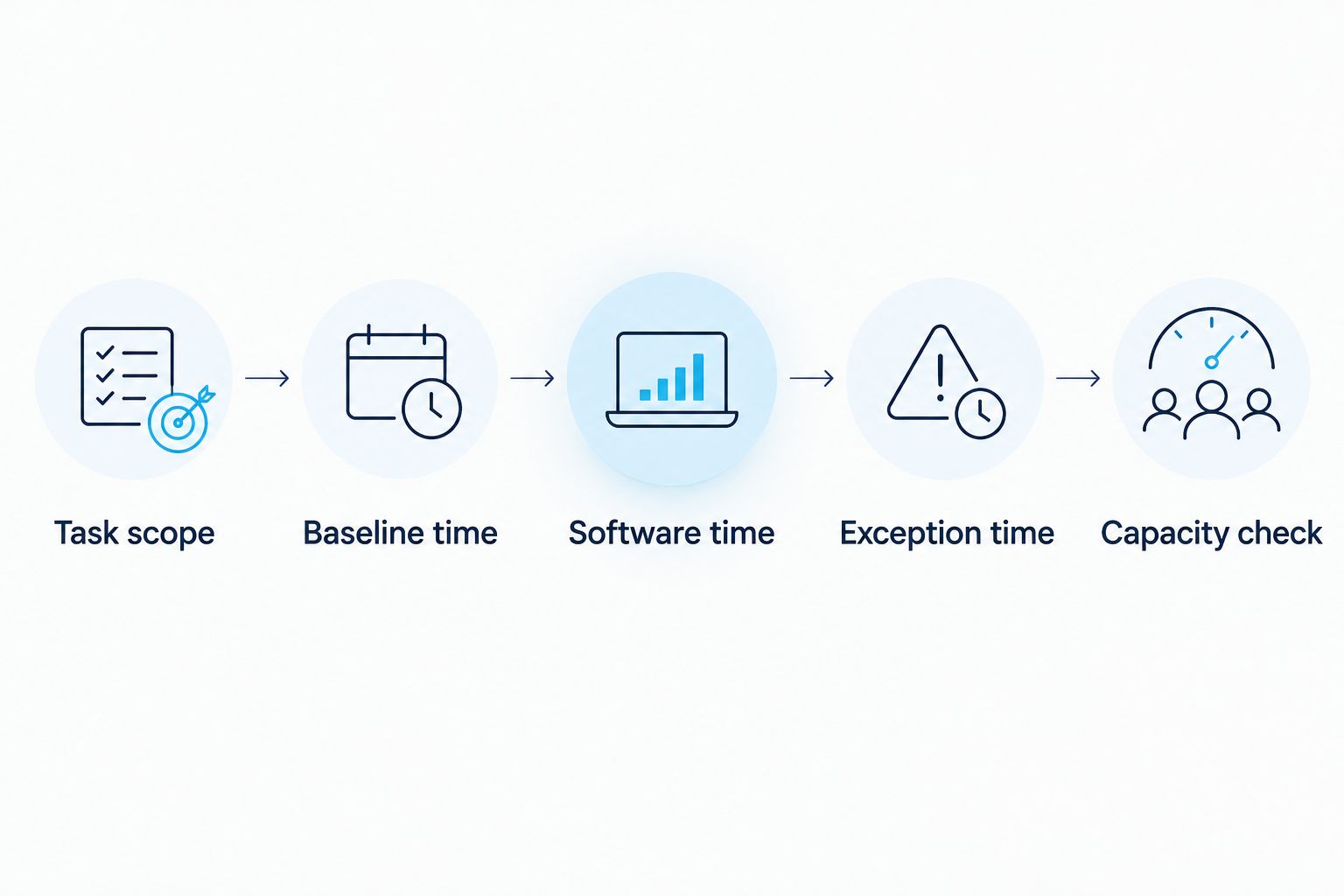
Keep the completion standard unchanged throughout the comparison. If the manual process includes a client-ready explanation but the replacement process ends at an account change, you are measuring different deliverables. Add the explanation work back into the replacement workflow.
Hypothetical workflow example: You currently inspect an account, decide whether action is needed, make the change, and document the reason. A proposed replacement handles part of that sequence, but you still review exceptions and prepare the client explanation. Count those remaining steps before claiming a saving; this example describes an evaluation method, not a product capability.
Count the full operating burden in 2026
Build the cost side from the actual terms and requirements of each candidate. Keep recurring financial expenses separate from time overhead so your calculation stays readable and avoids double counting.
Your financial-cost worksheet should include:
- The recurring software expense under the arrangement you are evaluating.
- Required supporting services or subscriptions.
- Applicable account or usage charges stated in the vendor’s terms.
- Relevant one-time expenses, with a stated allocation method.
Your time worksheet should include setup, learning, review, maintenance, and exceptions. Put each activity in one place only. If setup time reduces net hours saved, do not also subtract its assigned financial value from the same time-based result.
Keep setup visible rather than burying it in an average. Show the initial implementation period separately from later operation. A workflow that becomes useful after setup is different from one that saves time immediately, even when both ultimately pass the same break-even test.
If you convert minutes to hours, divide by 60 minutes per hour. Use the same unit throughout the worksheet. Mixing minute-based task logs with hour-based values is an avoidable calculation error.
Choose an hourly value you can defend
Use the value of the work that the saved time will replace or enable. Start with a named activity, not a convenient rate. Examples include booked client delivery, proposal preparation, account planning, or time you intentionally stop working.
For revenue-producing work, distinguish gross billing from the contribution that remains after directly related expenses. Revenue is not the same as economic benefit. Using gross billing without recognizing delivery expenses overstates the value of recovered capacity.
For internal work, explain why the task matters rather than inventing a return. Recovering time for documentation or account review can improve your operating process, but the time-saving calculation alone does not establish a financial outcome.
If your goal is fewer working hours, say so. Evaluate whether the recurring expense is acceptable for that reduction in workload. You do not need to describe every saved hour as new revenue to make a sound purchase decision.
Compare workflows, not automation labels
A buying evaluation should compare how work changes under each approach. The following categories describe evaluation choices, not verified capabilities of any named product.
| Approach | Best for | Potential benefit to verify | Trade-off to measure |
|---|---|---|---|
| Manual management | Tasks requiring direct operator judgment | Full control over each action | Execution remains on your schedule |
| Rule-based automation | Repeatable actions with explicit conditions | Less repeated execution | Rule maintenance and exception review |
| Autonomous campaign management | Operators evaluating broader delegation | Less direct involvement in covered work | Oversight, boundaries, and correction effort |
Choose the workflow that reduces your specific bottleneck, not the one with the broadest label. A narrowly defined process that removes repeated work is useful if that work consumes your capacity. A broader approach is useful only when its actual coverage and remaining oversight match your needs.
AdCrew OS is positioned for solopreneurs and one-person agencies evaluating autonomous ad campaign management. Assess that positioning against your task inventory; it does not establish specific integrations, controls, or measured savings.
For any candidate, request evidence of the workflow you need. Distinguish a demonstrated capability from an announced capability, and distinguish both from a result measured in your own operation. Those are different levels of evidence.
Why break-even time savings vary
The same software expense can produce different break-even results because the underlying work differs. Use these drivers to explain your result rather than treating every client account as identical.
- Task frequency: A repeated task provides a different savings opportunity from occasional work.
- Account complexity: Different objectives, structures, and approval requirements change the remaining workload.
- Client approvals: Saved execution time does not remove an approval step unless the workflow actually changes it.
- Review burden: Checking every action adds a different time cost from reviewing a defined exception queue.
- Exception handling: Corrections, access problems, and unusual account conditions consume recovered time.
- Usable work blocks: Fragmented minutes do not automatically fit the work you want to add.
Record these conditions alongside your result. Otherwise, a successful evaluation on a straightforward account becomes an unsupported assumption about every account you manage.
When the account mix changes, revisit the calculation. Keep the task definitions stable so you can see whether the workflow became more efficient or simply encountered easier work.
How do you calculate net time savings without overstating them?
Net hours saved equal baseline task hours minus remaining task hours and software overhead hours. Include all work needed to reach the original completion standard. Excluding checking or correction work inflates the result.
Keep a separate exception log during the evaluation. Record the issue, the action required, and the time spent resolving it. A smooth run and a run with exceptions provide different evidence; neither should silently stand in for the other.
Does saving campaign-management time let you manage more clients?
Saved campaign-management time creates additional account capacity only when the remaining client responsibilities also fit. Review onboarding, communication, approvals, strategy, and reporting before committing to another account.
Hypothetical capacity example: A workflow shortens recurring account maintenance, but client calls still occupy the work blocks needed for another account’s onboarding. The execution saving is real; the additional capacity is not yet usable. This is an operating example, not a customer result or a promise about any software.
Should you buy software that does not break even on time savings?
Software that fails the time-saving test needs a separately justified benefit. That benefit might concern a specific operating requirement rather than saved hours, but you must evaluate it independently. Do not relabel an unmeasured benefit as time savings.
If capacity is your buying objective, a failed capacity test is a reason to pause. Identify the unresolved bottleneck before adding another recurring expense.
FAQ
How do I calculate break-even time savings for PPC software for agencies?
Divide the software’s full operating cost by the value of an hour you can realistically redirect. Compare the required hours with net hours saved after remaining task work, checking, maintenance, and exceptions.
Should I use my billing rate to value saved time?
Use your billing rate only when it represents work you can actually sell and deliver with the recovered time. Distinguish gross billing from contribution after directly related expenses.
Do onboarding hours count against software time savings?
Yes, onboarding hours belong in the evaluation. Show the initial implementation period separately from later operation, and avoid counting the same setup burden twice.
Is autonomous campaign management better than rule-based automation?
Neither approach wins without a task-specific evaluation. Compare the work each approach demonstrably removes with the oversight, maintenance, and correction effort it leaves behind.
Can PPC software help a one-person agency manage more accounts?
PPC software creates usable account capacity only when verified savings fit the agency’s remaining client responsibilities. Execution savings alone do not establish capacity for onboarding, communication, approvals, or strategy.
What is AdCrew OS positioned to do?
AdCrew OS is a pre-launch platform for autonomous ad campaign management for solopreneurs and one-person advertising agencies. Its positioning centers on helping one person manage more client accounts, not a quantified proven outcome.
What should I include in a 2026 PPC software evaluation?
Include baseline task time, replacement workflow time, software overhead, actual operating terms, and a capacity check. Use the same completion standard and measurement period for both workflows.
One last thing: test the calendar, not just the total
A positive time-saving calculation is not permission to add a client. Put the recovered work blocks on your calendar and assign the work you intend to do with them. If that work does not fit, the bottleneck remains.
Use this checklist before committing:
- Define the recurring task and its completion standard.
- Measure the baseline from trigger to finished delivery.
- Verify the candidate’s relevant capabilities rather than relying on positioning.
- Include setup, checking, maintenance, and exception handling.
- Keep time units and measurement periods consistent.
- Avoid counting the same operating burden twice.
- Assign a defensible value to the recovered time.
- Confirm that net hours saved meet the break-even requirement.
- Place the recovered work blocks on your calendar.
- Check every remaining responsibility before accepting another account.
Buy against the bottleneck you measured. Keep the worksheet, because your next account can change the result.