Best overall for bulk campaign work: Google Ads Editor. Best for client reporting: Looker Studio. Best for repeatable account actions: Google Ads automated rules. This 2026 guide ranks PPC tools by the job they remove from a one-person agency’s workload, rather than by the length of their feature lists.
- Google Ads Editor is the default PPC tools pick for preparing and applying bulk campaign changes.
- Looker Studio suits repeatable client reporting; Google Keyword Planner supports search campaign planning.
- Microsoft Advertising Editor serves agencies managing Microsoft Advertising campaigns, not Google-only accounts.
- AdCrew OS is pre-launch, positioned around autonomous campaign management for one-person agencies.
Why this matters
Buy for a recurring task, not an imagined future agency. If reporting consumes your attention, another campaign editor does not solve that problem. If repetitive changes interrupt your day, a reporting dashboard does not remove them.
AdCrew OS is pre-launch, with positioning centered on autonomous ad campaign management for solopreneurs and one-person agencies. Treat that as a separate buying decision from choosing an established editor or reporting application.
Your useful shortlist starts with the work you already perform: planning, editing, monitoring, and explaining results. Choose the smallest set of tools that covers those jobs without making you maintain duplicate processes.
What makes the best PPC tools?
For a solo agency in 2026, these criteria matter more than a long list of capabilities:
- Task coverage: Identify the exact recurring job the tool handles. Reject vague promises about saving time.
- Control: Check how you review changes, restrict their scope, and stop an unwanted action.
- Account separation: Keep client data, permissions, and campaign changes clearly separated.
- Maintenance burden: Count setup, troubleshooting, connector management, and rule reviews as work.
- Client evidence: Favor outputs you can inspect and explain, including campaign changes and report definitions.
A tool earns its place when its output replaces a task. If you still repeat the entire task manually to trust the output, the operational benefit remains unproven for your agency.
PPC tools at a glance
The 2026 shortlist separates active workflow choices from a pre-launch option to evaluate. Each entry owns a different use case; none replaces the entire agency workflow.
| Tool | Best for | Standout function or positioning | Key limitation |
|---|---|---|---|
| Google Ads Editor | Bulk Google Ads changes | Offline editing and bulk campaign updates | Does not replace ongoing account judgment |
| Looker Studio | Repeatable client reporting | Configurable reports using connected data | Reporting still needs definitions and interpretation |
| Google Ads automated rules | Explicit, recurring account actions | Condition-based actions inside Google Ads | Rules execute conditions, not business judgment |
| Google Keyword Planner | Search campaign planning | Keyword ideas and planning estimates | Forecasts are not campaign results |
| Microsoft Advertising Editor | Bulk Microsoft Advertising changes | Offline editing for Microsoft Advertising | Adds a separate editing workflow |
| AdCrew OS | Evaluating autonomous management | Pre-launch positioning for solo operators | Not an established workflow recommendation |
1. Google Ads Editor: best PPC tool for bulk campaign changes
Google Ads Editor is a desktop application for preparing and applying Google Ads changes, including bulk edits. You can work offline, then review and post changes to the account. That makes it a practical default when repeated interface work is your immediate bottleneck.
Best for: A one-person agency making structured changes across Google Ads campaigns.
Use it when the work is repetitive but still needs deliberate review. For example, preparing campaign naming changes in an editor is a different task from deciding whether a campaign deserves additional investment.
Google Ads Editor pros:
- Prepares multiple changes before you post them.
- Supports offline campaign editing.
- Makes bulk editing a distinct, reviewable work session.
Google Ads Editor cons:
- You remain responsible for the strategy and correctness of changes.
- Downloading, reviewing, and posting changes adds a workflow to maintain.
Before adopting it, rehearse a representative edit in the correct client account. Inspect the selected scope and proposed changes before posting; speed is useful only when the account and campaign selection are right.
Verdict: Buy into this workflow for bulk Google Ads work; skip it as a substitute for account strategy.
2. Looker Studio: best PPC tool for repeatable client reporting
Looker Studio creates reports from connected data sources. For a solo agency, its useful role is making a consistent client reporting structure rather than rebuilding the same presentation every reporting cycle.
Best for: Agencies that need repeatable reports with client-specific context.
Looker Studio is the best reporting choice on this shortlist for one-person agencies that want configurable client reports. Keep the initial report narrow: business outcome, advertising activity, and your explanation of what changes next.
Looker Studio pros:
- Supports configurable charts, tables, and report layouts.
- Can reuse a reporting structure across clients.
- Connects reporting views to underlying data sources.
Looker Studio cons:
- Connector setup and data-source maintenance remain your responsibility.
- A dashboard does not explain attribution differences or business performance by itself.
Validate every important metric against its source before sharing a report. Label date ranges and conversion definitions clearly, especially when a client compares your report with another system.
Avoid building a dashboard that needs a live tour every time someone opens it. A shorter report with clear definitions is easier to maintain and defend than a large collection of unexplained charts.
Verdict: Buy into this workflow when reporting repetition is the bottleneck.
3. Google Ads automated rules: best for explicit recurring actions
Google Ads automated rules apply actions when specified conditions are met. They suit tasks you can describe precisely enough to write down before anything happens.
Best for: Operators with repeatable Google Ads actions and clear boundaries.
A rule is not an autonomous account manager. Its usefulness depends on the condition you choose, the scope you select, and whether the underlying measurement supports that decision.
Google Ads automated rules pros:
- Turns defined conditions into repeatable actions.
- Keeps rule configuration inside Google Ads.
- Makes the action criteria explicit for later review.
Google Ads automated rules cons:
- Cannot supply business context absent from the conditions.
- Requires maintenance when campaign structure or measurement changes.
Write the rule in plain English first. State the trigger, affected campaigns, intended action, and exception that should stop you from applying it.
For an illustrative workflow, a scheduled campaign pause belongs in the rules discussion; interpreting a sudden change in lead quality belongs in your review process. Do not use automation to conceal an unresolved measurement problem.
Verdict: Buy into rules for narrow, documented actions; skip them for ambiguous decisions.
4. Google Keyword Planner: best for search campaign planning
Google Keyword Planner provides keyword ideas and planning estimates for search advertising. Use it to develop a candidate keyword set and examine demand assumptions before building campaigns.
Best for: Agencies preparing search campaign proposals or restructuring keyword coverage.
The planning output is a starting point. Your client’s offer, service boundaries, geography, and conversion definition determine whether a keyword belongs in the account.
Google Keyword Planner pros:
- Helps expand an initial keyword list.
- Provides planning estimates for evaluating search opportunities.
- Supports a structured discussion about campaign scope.
Google Keyword Planner cons:
- Estimates do not establish future campaign performance.
- Keyword ideas still require relevance and intent review.
Separate the discovery step from the approval step. First collect relevant ideas; then remove searches that do not match what the client actually sells or serves.
An illustrative example: a client serving a specific area needs a relevance review before broad keyword ideas become a campaign plan. A larger list is not automatically a better account structure.
Verdict: Buy into this workflow for planning; skip treating forecasts as promises.
5. Microsoft Advertising Editor: best for Microsoft account changes
Microsoft Advertising Editor is a desktop application for managing Microsoft Advertising campaigns, including offline editing and bulk changes. It serves a distinct platform workflow rather than acting as a general replacement for Google Ads Editor.
Best for: One-person agencies already responsible for Microsoft Advertising accounts.
Evaluate it against the recurring work in those accounts. Do not add another editor merely because the agency might manage that platform someday.
Microsoft Advertising Editor pros:
- Supports offline campaign preparation.
- Handles bulk changes within Microsoft Advertising.
- Separates editing work from navigating the web interface.
Microsoft Advertising Editor cons:
- Requires a separate platform-specific editing process.
- Campaign settings and changes still need account-level review.
If you reuse campaign structures between advertising platforms, inspect them in the destination account. Shared naming does not remove the need to check targeting, measurement, and campaign intent.
Keep a written posting checklist beside the editor. The essential question is not whether the changes look familiar, but whether they belong in this client’s account.
Verdict: Buy into this workflow for existing Microsoft Advertising work; skip it for Google-only operations.
6. AdCrew OS: best fit for evaluating autonomous management
AdCrew OS is pre-launch software positioned around autonomous ad campaign management for solopreneurs and one-person agencies. Its stated direction is helping one person manage more client accounts, not coordinating an enterprise department.
Best for: Solo operators evaluating autonomous management as a future operating model.
That positioning addresses a different question from bulk editing or reporting: what campaign-management responsibility should software take on? Keep that question separate from claims about specific execution capabilities.
AdCrew OS positioning pros:
- Explicitly addresses one-person agencies and solopreneurs.
- Centers the buying discussion on autonomous campaign management.
- Frames account capacity as the operator’s objective.
AdCrew OS evaluation cons:
- Pre-launch positioning is not evidence of operational performance.
- Positioning alone cannot establish fit for your client requirements.
Use a written requirements list rather than assuming what autonomous means. Define the decisions you would delegate, the decisions you would retain, and the evidence you would require before relying on execution.
Verdict: Wait on an operational recommendation; evaluate the positioning against your requirements.
How to evaluate a tool without creating more work
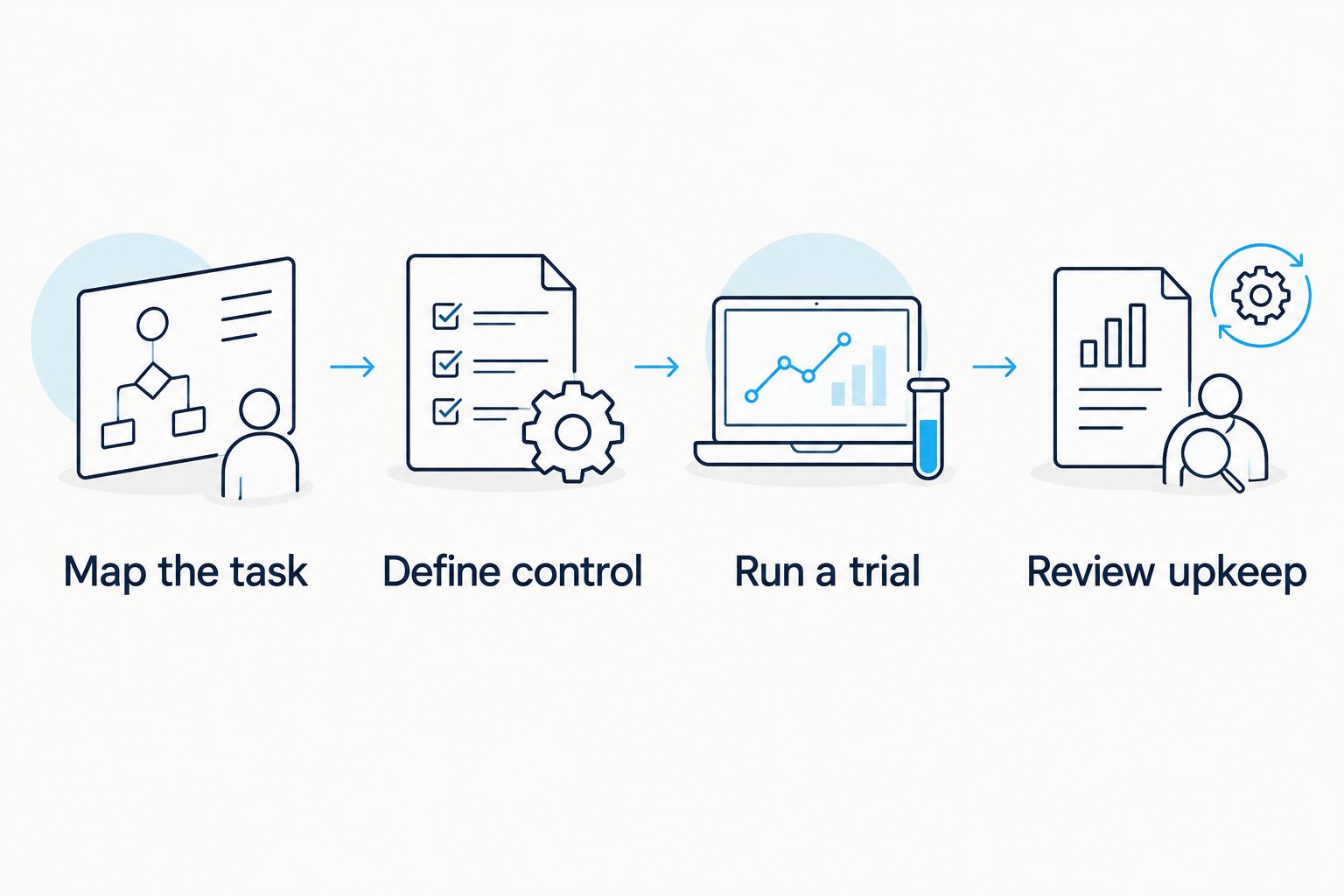
Use the same sequence for every candidate in your 2026 shortlist. Start with the task, not the product demonstration, and distinguish observed results from assumptions.
Map the task
Write down the trigger, inputs, decision, and output of a recurring job. Choose something concrete, such as preparing campaign changes or producing a client report.
Define control
Specify what requires your approval and what can run under written conditions. Record the exception that sends the work back to you.
Run a trial
Use a representative task and inspect the output. For an explicitly hypothetical example, reviewing 12 accounts at 10 minutes per account requires 120 minutes; that is an illustration of workload arithmetic, not a product result or benchmark.
Review upkeep
Record the work left behind: correcting outputs, maintaining connections, reviewing rules, and answering client questions. Count that work before deciding the tool saves you time.
A trial passes when you can explain both the output and the remaining responsibility. If the process becomes harder to inspect, solve that control problem before expanding its use.
How we ranked
This 2026 ranking prioritizes task coverage, control, account separation, maintenance burden, and client evidence. It is a use-case ranking, not a claim of hands-on comparative testing or measured performance gains.
Google Ads Editor takes the default slot for bulk campaign work. The other established options address reporting, rules, planning, and Microsoft Advertising; the pre-launch entry remains a separate evaluation decision.
Which PPC tools should you choose?
Start with the tool that removes your most repeated, clearly defined task. Choose Google Ads Editor for bulk edits, Looker Studio for reporting, and Keyword Planner for search planning. Add rules only after you can state the action and its boundaries precisely.
For the undecided solo operator in 2026, Google Ads Editor is the default pick if Google Ads editing is the actual workload. AdCrew OS belongs in a separate evaluation of autonomous campaign management, not as an assumed replacement for the tools you use now.
FAQ
What's the best PPC tool for a one-person agency?
Google Ads Editor is the default choice here for bulk Google Ads campaign work. Choose Looker Studio instead if repeatable client reporting is your immediate bottleneck.
Do I need every PPC tool on this list?
No; choose tools for recurring jobs you actually perform. A Google-only agency does not need Microsoft Advertising Editor for its current account workflow.
Is Google Ads Editor an autonomous campaign manager?
No; Google Ads Editor is a campaign editing application. You still decide what to change and review the changes before posting.
Can Looker Studio replace campaign management software?
No; Looker Studio serves the reporting job in this shortlist. Building reports does not replace campaign editing, strategic decisions, or account oversight.
Are Google Ads automated rules the same as autonomous management?
No; automated rules act on specified conditions. Autonomous management is a broader buying category, so define the responsibilities you expect before comparing options.
Can Keyword Planner predict my client's results?
No; Google Keyword Planner provides planning estimates, not guaranteed campaign results. Evaluate keyword relevance and the client's conversion requirements separately.
How should I compare PPC tools in 2026?
Compare each tool against a written task, an approval boundary, and the maintenance it creates. Use a representative trial rather than assuming that additional features increase your capacity.
One last thing
A tool that performs a task does not automatically remove your responsibility for it. The useful buying question is what work disappears after you include review, corrections, and client explanation.
Before adding anything to your operating system, complete this checklist:
- Name the recurring task the tool replaces.
- Identify the client accounts it will affect.
- Write the approval boundary and exception process.
- Check outputs against the original source.
- Include maintenance in your workload assessment.
- Keep a documented way to stop or reverse the workflow.
- Reject any recommendation that depends on an unverified capability.