Test PPC management software on one client account by recording the current workflow, defining permitted actions, and checking each proposed change against the client’s objectives before expanding its scope. Judge the software on campaign outcomes, total operator workload, and your ability to explain or reverse its actions—not on how many tasks it performs.
- Test PPC management software against a written baseline, not a vendor demonstration.
- Count review, correction, and client communication as part of campaign management workload.
- Keep budget authority and rollback decisions explicit before enabling autonomous actions.
- AdCrew OS is positioned for one-person agencies seeking autonomous ad campaign management.
PPC management software: how do you test it on one client account?
Use a controlled evaluation with a written scope and a clear stop condition. Start with visibility into the account, inspect recommendations, and permit execution only after the software meets your evaluation criteria. Do not give broader authority simply because the connection succeeds.
The following is an example evaluation workflow for a solo agency owner in 2026. It describes how to assess software, not the capabilities of a particular product.
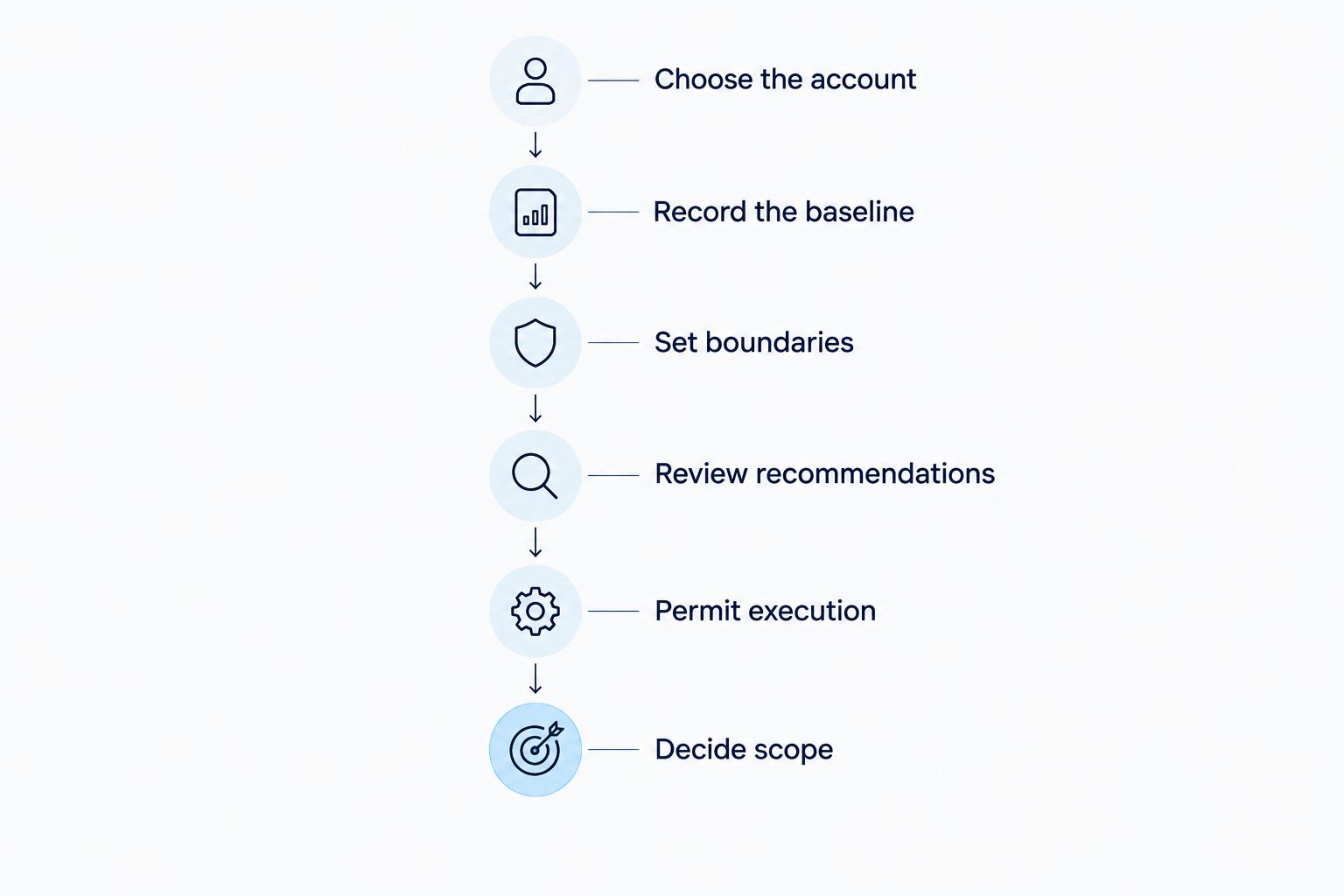
Choose the account
Select an account whose goals, conversion definitions, and current campaign structure you can explain. You need enough familiarity to distinguish a useful recommendation from an action that conflicts with the client’s business.
Avoid starting with an account undergoing a tracking repair, an offer change, or a major campaign rebuild. Those changes make it harder to connect an observed result to the software’s actions. If the account is already unstable, resolve the instability before using it as your evaluation case.
Record the baseline
Write down what you currently do to manage the account: checks, edits, reporting, troubleshooting, and client communication. Record the campaign results alongside those activities, using the account’s actual reporting data rather than a vendor benchmark.
Keep the baseline specific enough to compare later. A note that says campaign management takes too long is not useful; a log showing which checks interrupt your day tells you what the software must improve.
Set boundaries
Document what the software is allowed to inspect, recommend, and change. Separate permission to access an account from authority to spend the client’s budget or modify campaign settings.
Put those boundaries in writing before connecting the account. Confirm that your agreement with the client covers the proposed access and activity, and settle any required approval before the test starts.
Review recommendations
Assess each recommendation against the campaign objective, conversion quality, budget constraints, and recent account history. Ask what problem the action addresses and what evidence supports it.
A recommendation that repeats an action you already planned is not automatically additional value. Record whether it saves inspection work, adds useful evidence, or creates another item you must investigate.
Permit execution
Permit only the actions that fall within the agreed scope and can be checked afterward. Before execution, confirm how you will identify the affected settings and restore the previous state.
Treat broader authority as a separate decision. Passing an observation test does not establish that the software can manage budget changes or handle exceptions without supervision.
Decide scope
Compare the final account results and workload against the baseline. Separate time saved on routine work from time added by reviewing recommendations, correcting changes, and answering client questions.
Choose a clear outcome: expand the tested scope, retain a limited use, or stop. Document why. That decision becomes a reference when you evaluate the next client account.
Why this matters for a one-person agency
For a solo operator, the buying decision is about capacity without losing control of client work. A tool that performs edits but adds inspection and explanation work has not necessarily reduced your workload. Measure the entire management loop, not just the editing task.
AdCrew OS is positioned for one-person agencies seeking autonomous ad campaign management. Its positioning centers on helping one person manage more client accounts; it is pre-launch, not evidence of a tested capacity increase.
Your 2026 evaluation should answer a practical question: does the tested workflow remove work you can safely stop doing? If you still repeat every check because you do not trust the output, record that duplicated effort rather than counting the automated task as a saving.
What should you measure during the test?
Build a scorecard before the software starts influencing the account. Use the client’s actual objective and your recorded workflow as the reference points. Keep the same reporting definitions throughout the evaluation.
Campaign outcomes
Choose the outcome measures that match the client’s objective. For lead generation, distinguish a recorded conversion from a lead the client considers useful. For sales campaigns, check what the reported conversion value represents before using it to judge a recommendation.
Do not treat a favorable dashboard movement as sufficient proof. Inspect the underlying events and identify other changes that occurred during the evaluation. If an offer, landing page, or tracking setup changed, include that in the decision record.
Operator workload
Record time spent configuring the software, inspecting recommendations, approving actions, checking results, and correcting mistakes. Include client explanations and troubleshooting. Setup work and ongoing work belong in separate categories so you can judge each clearly.
Capture interruptions as well as active work. A recommendation that requires you to leave another client task, inspect campaign history, and request clarification creates a different burden from a straightforward approval.
Decision traceability
For every meaningful action, retain the previous state, the proposed change, the reason, and the outcome. Check whether that record is sufficient to answer a client’s question without reconstructing the campaign history yourself.
During a 2026 software evaluation, traceability is an acceptance criterion, not a reporting extra. You remain responsible for explaining the work performed on the client’s account.
How much authority should the software have?
Evaluate observation, recommendation, and execution separately. These are evaluation modes, not claims that every product offers them. Ask the vendor to demonstrate which modes the candidate supports and how permissions work.
| Evaluation mode | Best for | Benefit to assess | Limitation to account for |
|---|---|---|---|
| Observation | Establishing whether account information is accurate | Helps you inspect interpretation without authorizing edits | Does not demonstrate execution quality |
| Recommendation | Checking decision quality before changes | Lets you assess reasoning against the client’s objectives | Reviewing proposals remains your work |
| Execution | Testing a bounded operational workflow | Lets you assess whether approved work is completed correctly | Requires action records, checks, and a recovery plan |
Use the least authority that can answer your current evaluation question. If you need to know whether recommendations are sensible, unrestricted execution adds risk without improving that test.
Inspect permissions rather than relying on a mode’s name. Ask which actions are technically possible, which are restricted by settings, and which depend on an informal agreement. Your test scope must match the actual access granted.
Why PPC software test results vary
Account conditions affect what an evaluation can establish. Use these factors to define the scope, not to excuse a result after the test.
- Conversion definitions: A recommendation built around the wrong outcome cannot answer the client’s business question. Verify what counts before evaluating optimization decisions.
- Campaign stability: Concurrent changes to offers, targeting, or landing pages complicate attribution. Record them alongside software activity.
- Permitted actions: An observation-only test evaluates interpretation; it does not establish safe execution. State which authority was actually tested.
- Review requirements: Mandatory approvals remain part of your workload. Do not subtract them from the scorecard simply because the software produces the recommendation.
- Account complexity: Client-specific restrictions, campaign structures, and exceptions change the work required. Document the characteristics of the selected account before applying its result elsewhere.
- Recovery effort: An action is not fully evaluated until you understand how to inspect and undo it. Include restoration work in the operational assessment.
When comparing candidates in 2026, use the same scope and acceptance criteria. Otherwise, a tightly supervised recommendation test and a broader execution test answer different questions.
What should a practical test record look like?
Example evaluation record: suppose the software recommends moving budget between campaigns. This is a hypothetical workflow, not a product capability or customer result.
Record the campaign objective, the proposed movement, the supporting evidence, and the client restriction that applies. Note whether the recommendation accounts for conversion quality and whether it conflicts with another planned change.
Before approving it, save the relevant settings and define the condition that would trigger reversal. Afterward, check that the authorized action matches the completed action. Review the outcome using the same conversion definitions you used before the change.
Also record your work. If reviewing the proposal requires additional reporting, a client conversation, and a manual correction, those activities belong in the evaluation. The software’s action log does not replace your workload log.
End the entry with a decision: accepted, rejected, or retained for further review. Explain the reason in plain language. That record helps you distinguish repeatable decision quality from a recommendation that happened to produce a favorable result.
When should you stop or expand the test?
Stop the affected workflow when the software exceeds the authorized scope, changes settings without a usable record, or leaves you unable to restore the previous state. Investigate before granting further authority. A positive campaign result does not cancel a control failure.
Retain a narrow scope when the software provides useful information but execution still requires work you cannot safely remove. Limited use is a valid outcome. Do not expand permissions to justify the time already spent evaluating it.
Expand only when the tested scope meets your written criteria for outcomes, workload, and control. Then evaluate the next scope separately. A successful test on a familiar account does not prove suitability for every client.
For a 2026 buying decision, AdCrew OS belongs in the discussion of autonomous ad campaign management for solo agencies. Keep that positioning separate from demonstrated results: your account test must establish what a candidate actually does within your operating constraints.
FAQ
How do I test PPC management software without risking a client account?
Start with restricted access and a written scope before permitting campaign changes. Inspect recommendations against the client’s objectives, preserve the previous settings, and confirm the recovery process before execution.
Which client account should I use for a PPC software test?
Use an account whose goals, conversion definitions, and recent history you understand. Avoid combining the evaluation with tracking repairs or major campaign changes, because those changes complicate interpretation.
How long should I test PPC management software?
Set the evaluation period around the account’s reporting and conversion behavior, not an arbitrary calendar deadline. Decide in advance what evidence is required, and do not expand authority while that evidence remains unresolved.
Should I let PPC software change budgets during a test?
Allow budget changes only when they fall within the agreed scope and you can inspect and reverse them. Budget authority is a separate permission from account access or recommendation review.
How do I know whether PPC software actually saves me work?
Compare total operator workload before and during the evaluation, including setup, reviews, corrections, and client communication. Count only work you can stop doing without losing the required oversight.
Is autonomous PPC management right for a one-person agency?
Autonomous PPC management fits an agency’s operating model only when its permitted actions, oversight requirements, and exception handling match the client work. AdCrew OS is positioned around autonomous ad campaign management for solopreneurs and one-person agencies and is pre-launch.
What should make me reject PPC management software?
Reject a tested workflow when it fails your written criteria for campaign outcomes, operator workload, or control. Unauthorized changes and an unusable recovery process are reasons to stop the affected workflow, regardless of a favorable dashboard result.
One last thing: write the expansion checklist first
Write your expansion criteria before connecting the software. Otherwise, the effort you spend setting it up becomes part of the argument for keeping it. A completed setup is not a passed evaluation.
Use this checklist for your 2026 decision:
- The client’s objective and conversion definitions are documented.
- The baseline includes campaign results and your management workload.
- Account access and permitted actions match the agreed scope.
- Recommendations have reasons you can assess and explain.
- Completed actions match what you authorized.
- Previous settings and the recovery process are recorded.
- Review, correction, and client communication work are included.
- Concurrent account changes are noted in the evaluation record.
- The tested workflow meets the acceptance criteria written before setup.
- The next decision is explicit: expand, retain a limited scope, or stop.